How to do long run tasks in Vulcan Veil
Most chats are a simple question and answer iteration. Sometimes you want to do long tasks though -- such as write an extensive amount of python code (at the beginning of a project), or a long research task. In those scenarios, you should turn on some of the off by default tools in Vulcan Veil. Overall it is still quite safe (if starting from nothing, there are no files the tool can edit inappropriately or exfiltrate with a web search).
Turn these on first
Work in a project (a folder), and open the Sandbox panel at the top:
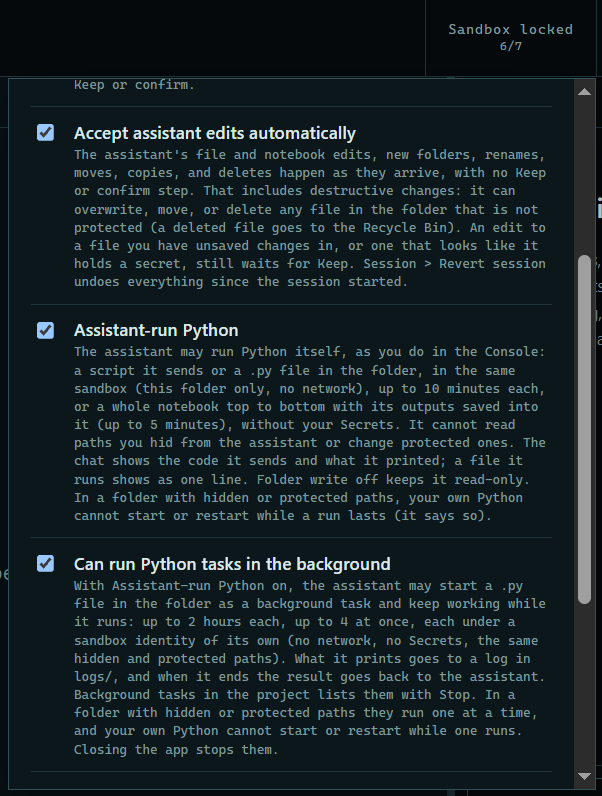
- Folder write and Assistant file edits, so it can make files.
- Accept assistant edits automatically. Otherwise every edit waits for you to press Keep, and the code it wrote never runs. This lets it overwrite, move, and delete files in the folder, so protect any file you want left alone. Session > Revert session undoes everything.
- Assistant-run Python, so it can run what it writes, up to 10 minutes a run.
- Can run Python tasks in the background, for a script that takes longer, such as a simulation or a model fit. Each may run up to 2 hours, up to 4 at once, and the assistant keeps working while they run. See Running Python in the background.
- For research, Web search in the chat box, with Sites set to the whole web or to your list.
Create a Plan
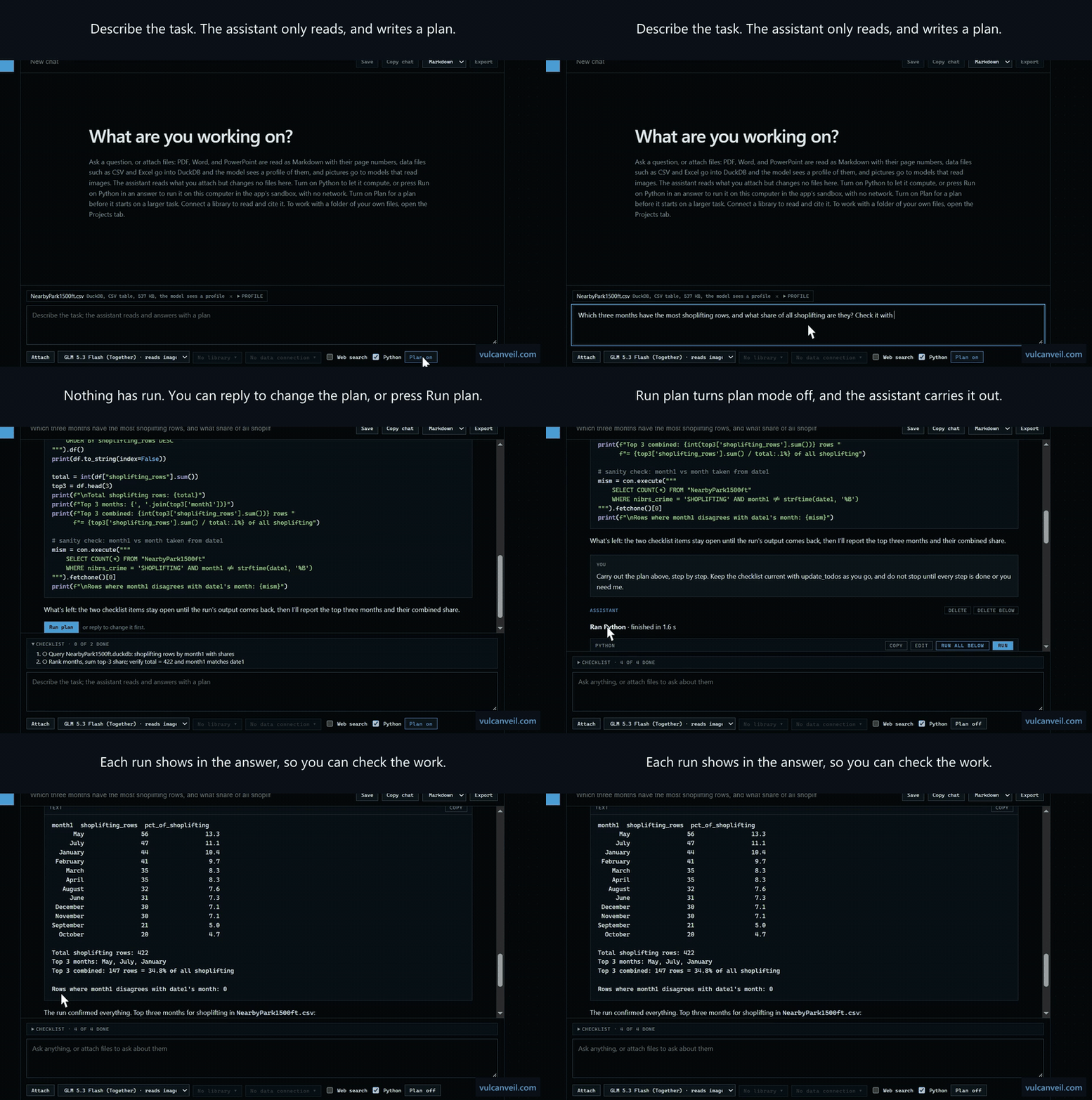
When you construct your prompt, list out the specific steps the agent should take. Like where to search for resources, or the types of python functions you want. The more explicit you are in your initial prompt, the more likely the agent will continue the entire task without asking for feedback.
Some Limitations to Long Run Tasks
There are certain actions you will need to do on your own to allow the agent to conduct long run tasks in some scenarios. Some of these are:
- Installing python libraries: the base installation comes with many libraries, but if there is a specific library you need that is not included, you will need to add it yourself under Session > Python packages in the project.
- There is no outside network (besides some whitelisted data from OpenStreetMap and Census). If your task requires data, you will need to either include the data in the project, or set up a data connection.
One final limitation -- I do limit the length of long running tasks (background tasks can run for up to 2 hours). In those scenarios, it is best to have the AI write out a bat script for you to run on your own (say a large simulation that will take overnight).
A Demo Long Task: A research paper extending self-exciting crime models
As a demonstration of long run tasks in Vulcan Veil, I had the tool research a paper topic I was interested in -- extending self-exciting models to include a dampening term for arrests. For those not familiar, self-exciting point process models are popular to forecast crime: one crime can precipitate reciprocating violence, or an individual can be emboldened or go on to additional crimes. An arrest may stop that one crime spreading into more crimes.
You can see the initial prompt, the subsequent chats, and the resulting final paper in this repository.
| Model | Time | Cost | Result |
|---|---|---|---|
| Muse Spark Open (Together) | 13 min | $4.80 | Paper and simulated data. No code files, no web search. |
| Inkling 2 Small (Together) | 16 min | $1.40 | A package (simulator and estimator) and a smoke test. No paper: it stopped with 6 of its 8 checklist items open. |
| OpenAI gpt-6-luna (my own key) | 33 min | about $1.25, billed by OpenAI | Paper, one script, data, a figure. 43 web searches. |
| GLM 5.3 Flash (Baseten) | 2 h 10 min | $1.88 | Paper as PDF, a small package, a demo script, figures. |
| DeepSeek V4.1 Flash (Baseten) | 3 h 3 min | $6.33 | Paper as PDF, a package, four scripts, figures, 18 passing checks. |
These demonstrate the capabilities, limitations, and costs of doing long run tasks with models available in Vulcan Veil. Each of the papers came to approximately the same modeling strategy, but the variance in the writing was the biggest difference. I like the GLM 5.3 writing, but it just wrote a temporal model. The DeepSeek writing is pretty strange. The Inkling chat is quite good, but gave up a wee bit as it had issues writing the python simulation.
I ran each list through VerusCite. Each had issues with citations (DeepSeek, GLM, and Muse had hallucinations, GLM also got DOIs wrong, and Luna got one title slightly wrong).
They each had different recommendations for cities (which even Claude Code really struggled with). Even in the end no city has appropriate public shooting data for me to be able to estimate this model with a spatial component.
For comparison, I gave the same prompt to Claude Code, with Anthropic's Claude Fable 5.2 (and Opus 5.5 when my quota for Fable ran out). That run was not hands-off. I sent 16 more messages over about a day, most of them steering it toward cities whose open data really links a crime to its arrest, and it downloaded and used that data, which Python in Vulcan Veil cannot. The result is ArrestHawkes.
In the end it is a similar modeling strategy for each. I do not necessarily think Claude did all that much of a better job than GLM 5.3 Flash. So if I had spent the same level of effort with a human in the loop task with GLM 5.3 Flash it could have been a similar outcome. But overall I am quite happy with this demonstration, and even though it is more difficult to conduct long run tasks in Vulcan Veil, it is not impossible and quite reasonably priced.